Showing posts with label VSAN. Show all posts

Tuesday, November 8, 2016

Virtual SAN Cache Device upgrade

Replacing/Upgrading the cache+buffer device in VSAN

Dilemma: I've got a VSAN cluster at home, and I decided to switch from single diskgroups-per-host to dual to give myself a bit more availability as well as additional buffer capacity (with all-flash, there's not much need for a read cache).

My scenario has some unique challenges for this transformation. First, although I already have the new buffer device to head the new disk group, I don't actually have all the new capacity disks that I'll need for the final configuration: I'll need to use some of the existing capacity disks if I want to get the second disk group going before I have the additional capacity devices. Second, I have insufficient capacity in the remainder of the VSAN datastore to perform a full evacuation while still maintaining policy compliance (which is sort of why I'm looking to add capacity in addition to splitting the one disk group up).


The nominal way to perform my transformation is:
  1. Put the host into maintenance mode, evacuating all registered VMs
  2. Delete the disk group, evacuating the data so all VMs remain storage policy-compliant.
  3. Add the new device
  4. Rebuild disk group(s)
I already took a maintenance outage during the last patch updates and added my new cache+buffer device to each host, so "Step 3" is already completed.
And then I hit on something: While removing the buffer device from a diskgroup will cause the decommissioning of the entire disk group, individual capacity devices can be removed without upsetting more than the objects being stored on that device alone. I have sufficient capacity in the remainder of the disk group—not to mention on the other hosts in the cluster—to operate on individual capacity elements.

So, here's my alternative process:

  1. Remove one capacity device from its disk group with full migration

  2. Add the capacity device to the new disk group.

It takes longer because I'm doing the evacuation and reconfiguration "in series" rather than "in parallel," but it leaves me with more active & nominal capacity+availability than doing it on an entire diskgroup at once.

My hosts will ultimately have two disk groups, but they'll break one "rule of thumb" by being internally asymmetric: My buffer devices are 400GB and 800GB NVMe cards, respectively, so when I'm fully populated with ten (10) 512GB capacity disks in each host, four (4) will be grouped with the smaller and six (6) will be grouped with the larger. When you keep in mind that Virtual SAN won't use more than 600GB of a cache+buffer device regardless of its size, it actually has some internal symmetry: each capacity disk will be (roughly) associated with 100GB of buffer, for a ~5:1 buffer:capacity ratio.

CLI alternative

Although this entire process can be performed using the Web Client, an alternative is to write a CLI script. The commands needed are all in the esxcli storage or vsan namespaces; combined with some shell/PowerShell scripting, it is conceivable that one could:
  • Identify storage devices.
    esxcli storage core device list
  • Identify any existing disk group, cache+buffer and capacity devices
    esxcli vsan storage list.
  •  Remove one of the capacity disks with migration
    esxcli vsan storage remove -d <device> -m evacuateAllData
  • Create a new disk group using an available flash device from the core device list as the new group's cache+buffer device, and the recently evacuated device as the capacity device
    esxcli vsan storage add -s <cache+buffer device> -d <device>
  • Loop through the remaining capacity devices, first removing then adding them to the new disk group. The esxcli vsan storage remove command is blocking when run from the ESXi console, so your script should wait for full evacuation and availability before the next step in the script is executed.

Wednesday, April 2, 2014

An odd thing happened on the way to the VSAN...

Object placement

Cormac Hogan has a nice post on the nature of VSAN from an "Objects & Components" perspective, Rawlinson Rivera describes witness creation & placement, and Duncan Epping teaches the user how to see the placement of objects in VSAN.

Based on these (and many other articles written by them and other authors—check out Duncan's compendium of VSAN links) I thought I had a pretty good idea of how a VM would be laid out on a VSAN datastore.

Turns out, I was wrong...

Default use case

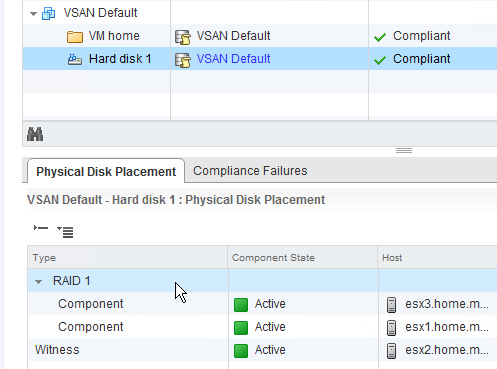
Take a VM with a single VMDK and put it on a VSAN datastore with no storage policy, and you get the default configuration of Number of Failures to Tolerate (nFT) = 1 and Number of Disk Stripes per Object (nSO) = 1. You'd expect to see the disk mirrored between two hosts, with a third host acting as witness:
Image shamelessly copied from Duncan
If you drill down into the object information on the Web Client, it bears out what you'd expect:

Multi-stripe use case

The purpose of the "Number of Disk Stripes per Object" policy is to leverage additional disks in a host to provide more performance. The help text from the nSO policy is as follows:
The number of HDDs across which each replica of a storage object is striped. A value higher than 1 may result in better performance (for e.g. when flash read cache misses need to get services from HDD), but also results in higher use of system resources. Default value 1, Maximum value: 12.
In practice, adding additional stripes results in VSAN adding a new "RAID 0" layer in the leaf objects hierarchy under the "RAID 1" layer. That first level is the per-host distribution of objects needed to meet the nFT policy rule; this second layer represents the per-host distribution of objects necessary to meet the nSO policy rule.


As you can see from the diagram, the stripes for a single replica aren't necessarily written to the same host. Somehow, I'd gotten the impression that a replica had a 1:1 relationship with a host, which isn't the way it's run in practice.

I'd also been misreading the details in the web client for the distribution of the components; when all your disks have a display name that only varies in the least-significant places of the "naa" identifier, it's easy to get confused. To get around that, I renamed all my devices to reflect the host.slot and type so I could see where everything landed at a glance:

As this screencap shows, the VM's disk is a 4-part stripe, split among all three of my hosts. One host (esx2) has all four components, so the other hosts need enough "secondary" witnesses to balance it out (three for esx3 because it hold one data component, one for host esx1 because it holds three data components). There's also a "tiebreaker" witness (on esx1) because the sum of the data components and secondary witnesses is an even number.

The other disks show similar distribution, but the details of disk utilization is not the same. The only thing I've found to be fairly consistent in my testing is that one host will always get an entire replica, while the other two hosts share components for the other replica; this occurs for all policies with nSO>1. If you have more than 3 hosts, your results will likely be different.